PM Vishwakarma Yojana Status Check 2026, pm vishwakarma gov in registration online login 2026 status check: The PM Vishwakarma Yojana is a big government push to support traditional artisans and craftspeople across India. If you’re a carpenter, blacksmith, tailor, barber, potter or any kind of traditional worker this scheme is built for you. It offers financial help, hands-on skill training, up-to-date tools, support for your business, and even guidance on digital payments and marketing. A lot of applicants are curious about what happens after they sign up. They want to know: how do I check if my application got approved?
Here’s a simple guide to check your application status for PM Vishwakarma Yojana. It lays out each step in plain English, making it easy for anyone to follow. So, what does the PM Vishwakarma Yojana actually do? Launched by the government to boost traditional trades, this scheme’s goal is to sharpen your skills, increase your income, and give your business a real chance to grow. You get skill training, money, tool kits, a low-interest loan if you need it, plus training in digital payments and marketing.Once you’ve applied, your info gets reviewed before anything happens. Waiting isn’t easy, but you don’t have to be left in the dark. Just hop online and check your application status whenever you want.
Why should you check your PM Vishwakarma Yojana status?
It’s simple you find out right away if you’re approved or if things are still processing. You’ll see if there’s any verification left, whether you forgot to upload a document, or get a clear idea on when to expect your benefits. Staying updated helps you avoid unexpected delays and keeps everything on track. Don’t just wait check in from time to time so nothing gets stuck.
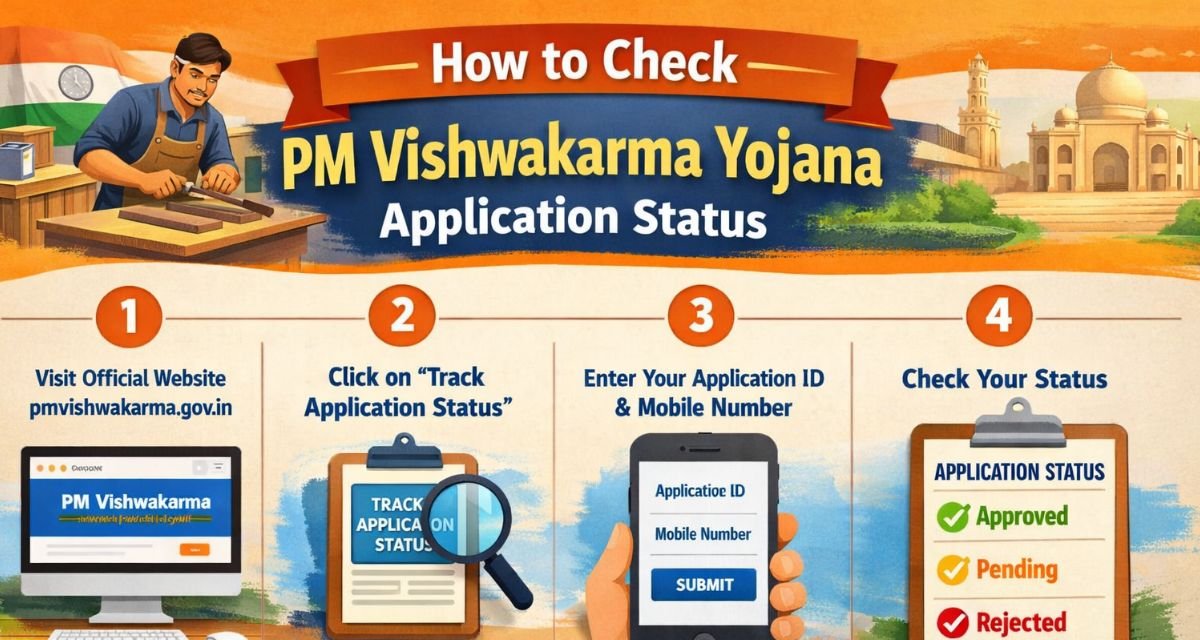
How to Check PM Vishwakarma Yojana Status Online
- 1. Open your internet browser and go to the official site: pmvishwakarma.gov.in. Make sure it’s the real government website, not a lookalike.
- 2. On the homepage, look for either “Applicant Login” or “Beneficiary Login,” and click whichever matches your case.
- 3. Enter your registered mobile number, fill in the captcha, and press “Login.” You’ll get a one-time password (OTP) sent right to your phone.
- 4. Enter that OTP and click “Verify.” Once that’s done, you’re logged in.
- 5. Once you’re inside, find your dashboard. Click on “Application Status.” There you go—your current application status will pop up on the screen. You’ll see whether your application’s submitted, under verification, approved, rejected, or still pending.
How to check your Status?
If you applied for PM Vishwakarma through a CSC centre, you don’t have to check your status online you can do it in person. Here’s how it works: Go to your nearest CSC center, give them your mobile number or application ID, and just ask the operator to look up your status. They’ll check for you and let you know what’s going on. It’s a handy option if you’re not comfortable with using the internet.
PM Vishwakarma Yojana Application Status Meaning (What Each Status Means)
Here’s what each application status means:
1. Submitted
You finished your application and sent it in. Now it’s just waiting for someone to check it.
2. Under Verification
People are looking over your application right now. They’ll check your documents, see if you’re eligible, and review the trade you picked. This step can take a few days, so hang tight.
3. Approved
Good news your application got the green light. Now you’ll get details about your training, loans, and toolkit benefits soon.
4. Pending
Something’s missing or still needs checking. Maybe you have to upload another document, fix a mistake, or just wait a bit longer for approval.
5. Rejected
Your application didn’t meet what they’re looking for. You can try again just fix the issues first.
To check your application status,
- Your registered mobile number
- Application ID (if you have one)
- Aadhaar number (sometimes they ask for it)
- Keep these handy when you want to see how your application’s going.
How long does approval take?
It usually takes about 7 to 30 days to verify your application, but that’s just an estimate. Sometimes, it goes faster, other times it drags on. It really depends on how many people are applying, how quickly your documents get checked, and how fast the local authorities work. If you’ve been waiting a while and nothing seems to be happening, just reach out to your nearest CSC center they can help you figure out what’s going on.
Who Can Apply for PM Vishwakarma Yojana?
Eligible applicants include traditional artisans such as:
- Carpenter
- Tailor
- Barber
- Cobbler
- Potter
- Goldsmith
- Blacksmith
- Washerman
- Mason
- Basket maker
- Toy maker
- Fishing net maker
Only eligible trades are allowed under the scheme.
Benefits After Application Approval
After your application gets the green light, here’s what comes next:
Skill Training
You’ll go through both basic and advanced sessions to sharpen your skills.
Tool Kit Incentive
The government hands out modern tools so you can deliver better work.
Loan Support
The program offers loans up to ₹1 lakh for the first round, and ₹2 lakh for the second. Plus, interest rates are low.
Digital Payment Training
You’ll learn how to handle online payments, use UPI, and manage digital transactions.
Marketing Support
The government pitches in to help get your business noticed.
Common Reasons for Application Delay
Your application may be delayed due to:
- Incorrect documents
- Incomplete application
- Aadhaar mismatch
- Mobile number mismatch
- High number of applications
Always check your details carefully before submitting.
Tips to Avoid Getting Your Application Rejected
Here’s how you can keep your application on track:
- Double-check the information you enter, make sure it’s accurate.
- Upload clear, easy-to-read documents.
- Use the right mobile number so you don’t miss any updates.
- Only apply if you meet all the eligibility rules.
- Keep checking your status so you catch any problems early.
- Following these steps keeps your application safe from rejection.
- If you run into trouble, don’t stress. You can:
- Go to your nearest CSC center.
- Reach out to your local authority.
- Check out the official website’s help section.
- Someone will step in and sort things out for you.
Frequently Asked Questions
Can I check PM Vishwakarma’s status without login?
No, you need to log in using your mobile number or application ID.
How many days does approval take?
Usually 7 to 30 days.
Can I apply again if rejected?
Yes, you can apply again after correcting the details.
Is there any fee to check the status?
No, checking status is completely free.
Final Verdict
So, here’s the thing if you’re a traditional worker or artisan, the PM Vishwakarma Yojana can really make a difference. Once you’ve applied, it’s smart to keep an eye on your application status. That way, you won’t miss out on updates or get stuck with any unexpected delays.
Checking your status isn’t a hassle. You can do it online with your mobile number, or just swing by a CSC center if you’d rather talk to someone in person. Just remember to check in from time to time and have your documents on hand.
When your application gets the green light, you get access to training, financial help, modern tools, and more business opportunities. The goal is simple help artisans boost their income and make life a bit easier.So, if you’ve applied, don’t wait follow the steps above and check your application status today.